Computers have become a distraction in the classroom for many teachers and students, but many teachers have found an aid in one bit of surveillance technology.
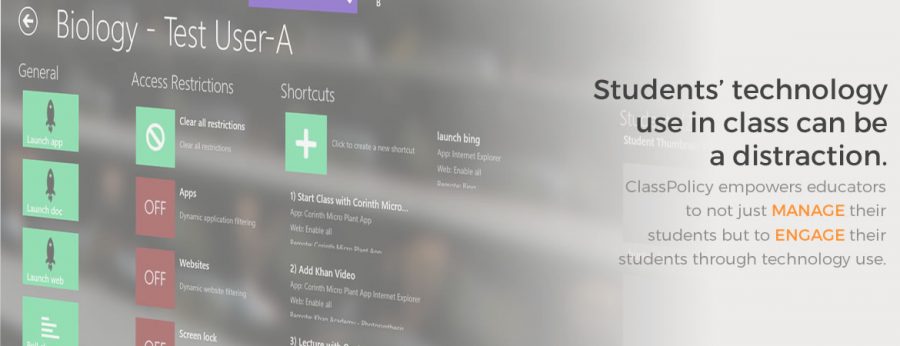
Class Policy, an app released June 9, 2013, allows teachers to see what students are doing on their computers.
The application was available initially for Windows 8 devices, focusing on managing student technology use by allowing teachers to lock student devices, restrict applications, monitor screens, and launch specific allowed programs.
Other applications that have the same objective as Class Policy are Class Dojo, Remind.com, LiveSchool, TalkingPoints, and Seesaw. All of these applications offer behavior tracking, and direct messaging/reminders from the teacher to the student. All of these apps are advertised to help teachers manage students so they can have a better experience getting their education while using modern technology for the benefits of learning.
“Our passion to improve the classroom experience for the next generation led us to develop a product that not only improves efficiency and control in a 1:1 classroom, but also allows teachers to truly integrate digital content into their lessons,” according to the Class Policy website.
A faculty member who wishes to stay anonymous teaches their students how to advocate and learn for themselves without putting on Class Policy.
“My classes are mostly all juniors and seniors, so I’m trying to teach them responsibility,” they said. “If I’m being this authoritative figure … they’re not going to learn good study habits here. When they go to college, they’re not going to have those.”
“Learning starts with the students, and I’m trying to teach them to be responsible for themselves and their actions in my classroom, so they know when they’re sitting in a classroom with a professor, they should be paying attention and not goofing around and doing something else,” they added.
Students, no matter the circumstance, however, are pulled by the allure of the computer.
According to Stanford University’s news site, digital tools have changed education in many ways both positive and not.
“Given the substantial amount of scholarly time I’ve invested in documenting the life-changing possibilities of digital technologies, it gives me no pleasure to suggest that these tools might be slowly poisoning us,” the study read.
The teacher who wished to remain anonymous, however, again puts the onus on their students to make mature decisions.
“A lot of times I catch them doing what they are not supposed to,” the teacher admitted, “but once again, I tell them, ‘It’s your personal responsibility to make sure you know this material.’ Can I force you to pay attention? No.”
At the end of the day, this teacher and others ultimately want the best for students, but some teachers recognize that the one-to-one computer model isn’t working perfectly.
Williston’s English Department implemented an intentional screen use policy for the 2025-2026 school year. Students in English classes across all grades are encouraged to take notes on paper, and only take out their computers when the teacher specifically calls for them to.
Aiyana Karanja, a senior boarding student from Manhattan, N.Y., says only one of her teachers uses Class Policy consistently.
“Okay, so, do I hate Class Policy? Oh my god, no, the answer is no, because barely any of my teachers use it except for Mr. Liebowitz,” Aiyana said. “He’s probably going to read this, but yes, you. So no, I don’t mind Class Policy. It’s only like an hour of my day and I’m okay with it.”
Aiyana finds that Class Policy does not impact her learning.
“I try my best not to stray on other apps,” she said. “I don’t shop during class. I don’t play games. I don’t do anything like, you know, that distracts me. One could say I am a goody-two-shoes, but I really don’t do so because I’m not comfortable shopping or playing games, like knowing that someone can just be watching me and like, ah, perceiving, that kind of scares me a little bit.”
Rarely, but sometimes, Aiyana gets off track in class.
“I sometimes am sending emails; I’m usually sending emails to people and scheduling appointments or responding back to Mr. Lonergan or something,” she said. “But I usually don’t look. I never play Wordle. I never play Scrabble. I never play, what’s that, what’s that, GeoGuessr?”
Kim Polin, Williston’s Academic Dean, said when Williston started using Surfaces about 12 years ago, it was with the understanding that teachers needed a way to control what their students were doing.
“It was important for the faculty to have a tool that could restrict the computer’s capabilities so we could manage distraction and focus in the classroom,” she said. “The software also allows us to do things like administer an online test or quiz in a secure environment.”
Polin supports Class Policy and all its options.
“It’s very helpful to be able to restrict what the computers can do during class so we can reduce distraction and support engagement and focus,” she said. “Class Policy as an app isn’t the easiest to use for teachers so Mr. [Will] Short [Director of Information Technology Services] is researching other options that would have similar features.”
Some of those features include lockdown browsers.
“It’s obvious that during an online or electronic test that it’s important to limit access to tools that might include AI, web browsing, or other prohibited materials,” she said. “During class, it’s also clear that reducing access to distractions (like YouTube) has a lot of benefit.”